Monday, November 24, 2014

E-Business 12.2 Step by Step Installation - Part 1


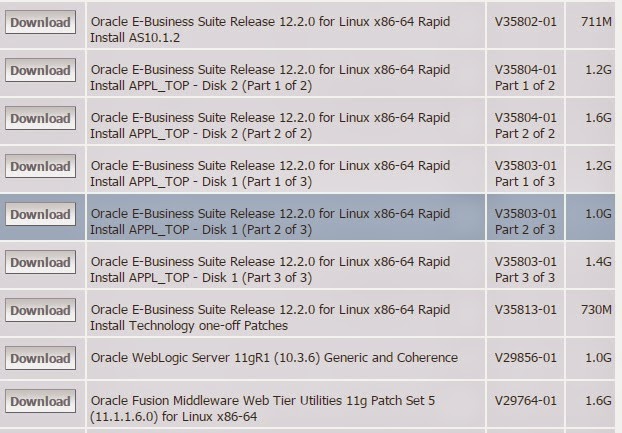
EBS 12.2 Step by Step Installation

1. Download below files from below link and unzip in staging area.


2. Download all 12.2.0 Rapid Install (All Disks and Parts) and keep it in zip source folder

mkdir /oapps_staging/ebs/software/zip

a)    Download database software install CD


b)    Download database Vision/Prod  Instance CD’s


c)    Download Application , One-Off Patches, Web Server & Web Tier Utilities CD’s


3. Check all requirements for Linux based on below Oracle Support Note.

Oracle E-Business Suite Installation and Upgrade Notes Release 12 (12.2) for Linux x86-64 (Doc ID 1330701.1)


Tuesday, November 11, 2014

ASM Scripts

ASM Scripts


Some Important v$ views for ASM

v$asm_diskgroup

v$asm_client

v$asm_disk

v$asm_file

v$asm_template

v$asm_alias

v$asm_operation 


Some useful scripts to get ASM details.

1) ASM Diskgroup Details

SELECT *
  FROM v$asm_diskgroup
 ORDER BY group_number;

2) ASM Connected database

SELECT ad.name,
       ac.instance_name,
       ac.db_name,
       status
  FROM v$asm_diskgroup ad,
       v$asm_client ac
 WHERE ad.group_number = ac.group_number
 ORDER BY ac.instance_name,
       ac.db_name, 
       ac.group_number;

3) ASM disk details

SELECT * from v$asm_disk;

4) ASM disk operations

SELECT * from v$asm_operation;

5) Free disk details

SELECT * from v$asm_disk;

check header_status is FORMER or CANDIDATE  

Wednesday, November 5, 2014

Oracle 12c RAC

Oracle 12c RAC

Oracle RAC 12c introduces two new concepts

Hub Nodes: They are connected among them via private network and have direct access to the shared storage just like previous versions. These nodes are the ones that access the Oracle Cluster Registry (OCR) and Voiting Disk (VD) directly.

Leaf Nodes: These nodes are lighter and are not connected among them, neither access the shared storage like the Hub Nodes. Each Leaf Node communicates with the Hub Node that is attached to, and its connected to the cluster via the Hub Node that is linked to.


Oracle FLEX ASM

In earlier releases (11g), ASM and database instances are tightly coupled with 1:1 mapping. If any ASM instance goes down then corresponding database node also crashes.

Oracle FLEX ASM - Introduced in 12c, ASM and database instances are loosely coupled, means every database node doesn't require ASM instance running on each node to serve storage. In 12c, by default you will get three ASM instances in cluster to server storage. In 12c, ASM instances use dedicated interconnect like database private interconnect in RAC.

Tuesday, October 1, 2013

11.2.0.4 database patchset - certified with EBS

11.2.0.4 database patchset is now certified with Oracle E-Business Suite 11i and R12.

11.5.10 E-Business Suite Consolidated Update 2 with ATG Rollup Patch 6 is certified with 11.2.0.4 database patchset


Interoperability Notes Oracle EBS 11i with Oracle Database 11gR2 (11.2.0) (Doc ID 881505.1)

12.0.4 or 12.1.1 E-Business Suite is certified with 11.2.0.4 database patchset

Interoperability Notes EBS 12.0 and 12.1 with Database 11gR2 (Doc ID 1058763.1)

12c database certified with 11i and R12

New oracle database 12c version is certified with ebusiness 11i and R12.

11.5.10 E-Business Suite Consolidated Update 2 with ATG Rollup Patch 7 is certified with 12c release 1 (12.1.0)database.


Please refer Interoperability Notes EBS 11i with RDBMS 12cR1 (Doc ID 1524399.1)

12.0.6 or 12.1.3 E-Business Suite is certified with 12c release 1 (12.1.0) database.

Please refer Interoperability Notes EBS 12.0 or 12.1 with RDBMS 12cR1 (Doc ID 1524398.1)

Oracle E-Business Suite 12.2 - Released

Oracle E-Business Suite 12.2 has been released just before oracle open world 2013 starts.


Below is the link "https://blogs.oracle.com/stevenChan/entry/ebs_12_2_now_available" regarding the details.


Tuesday, September 17, 2013

Oracle Apps R12 - Concurrent Program terminated by signal 25

Concurrent Program terminated by signal 25

Issue
Concurrent program getting errored with emsg:was terminated by signal 25

Solution
Concurrent program accessing reports.log in $APPLCSF/$APPLLOG will get above error if reports.log file size is more than 2 GB.

cd $APPLCSF/$APPLLOG
mv reports.log reports.log_bkup
touch reports.log

This File Size limit of 2 GB applies to any log/out file generated by EBS process. Any log/out file limit of 2 GB has been reached then corresponding process/program will get error out. This applicable for DB/Apps Listener as well.

Error: Signal 25 Concurrent Program Completes with Error (Metalink Doc ID 842850.1)